Three years into running my reseller operation, I had a provider switch middleware on me with 48 hours’ notice. No warning, no migration support — just a message saying the old Xtream Codes API endpoint was being deprecated. I had 60-odd active subscribers, all using Xtream-compatible apps. TiviMate, IPTV Smarters Pro, STBEmu — every single one of them relied on that Xtream URL structure to authenticate and pull streams.
The next 36 hours were not pleasant. But they taught me more about how Xtream IPTV actually works than any forum thread ever had. If you’re running a UK reseller business — or planning to — understanding Xtream isn’t optional. It’s the foundation everything else is built on.
Table of Contents
- What Xtream IPTV Actually Is
- How the Xtream Codes API Works
- Why UK Resellers Depend on It
- Xtream vs M3U: Which Should You Be Using?
- Setting Up Xtream on Popular Apps
- Common Xtream Panel Mistakes That Kill Profit
- Technical Breakdown: Bandwidth, Connections, and Costs
- Choosing a Panel That Handles Xtream Properly
- IPTV Reseller Success Checklist
What Xtream IPTV Actually Is
Let’s clear up a misconception that trips up newer resellers constantly. “Xtream IPTV” isn’t a service or a provider — it’s a protocol. Specifically, it refers to the Xtream Codes API, which became the industry-standard authentication and stream delivery framework for IPTV reseller operations worldwide.
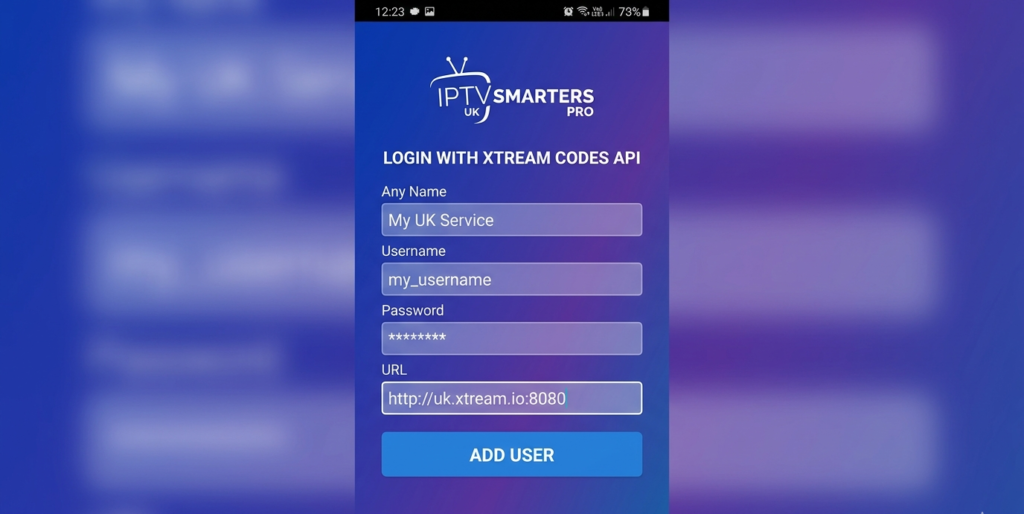
When a subscriber opens TiviMate or IPTV Smarters and enters a server URL, username, and password, that’s Xtream authentication in action. The panel on the backend manages those credentials, controls access, monitors concurrent connections, and delivers the stream playlist — all through the Xtream API structure.
In my experience, the resellers who understand this distinction operate far more confidently than those who just treat it as a login link they copy-paste to clients. Knowing what’s happening under the hood means you can troubleshoot faster, set expectations correctly, and choose your upstream provider with actual criteria rather than guesswork.
Pro Tip: Always verify that your upstream provider’s panel supports Xtream API output — not just M3U. If they only offer M3U, you’ll lose compatibility with a significant chunk of the most popular IPTV apps on the market.
How the Xtream Codes API Works
At its core, the Xtream Codes API operates on a straightforward request-response model. When a client app authenticates, it sends a GET request to your server URL with the username and password as parameters. The panel responds with a JSON payload containing the subscriber’s channel list, VOD catalogue, series library, and account metadata — expiry date, max connections, and so on.
This structure is why Xtream-compatible apps can display live TV, catch-up, and VOD all within a single interface. The API separates these content types cleanly, which is something a basic M3U playlist simply cannot do with the same elegance.
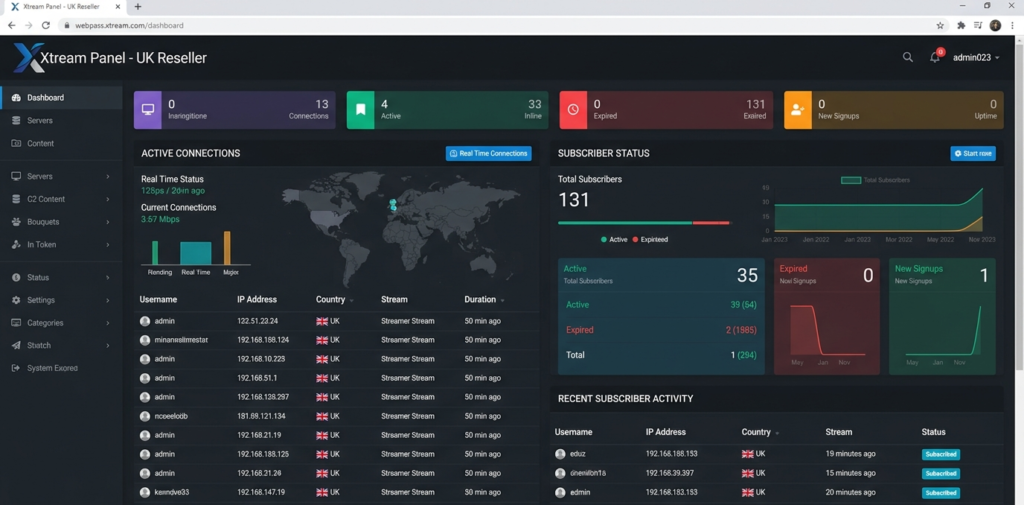
From a reseller management perspective, this also means your panel has granular control. You can cap concurrent streams per user, set hard expiry dates, and monitor which lines are active in real time. That level of control is what separates a professional operation from someone just sharing a playlist link on WhatsApp.
Why UK Resellers Depend on It
The UK market has specific characteristics that make Xtream compatibility almost non-negotiable. British subscribers tend to be more tech-literate than average — many have already used legitimate streaming platforms and have fairly high expectations around interface quality and reliability.
Apps like TiviMate and IPTV Smarters Pro have become the de facto standard for UK IPTV users, and both rely on Xtream authentication. MAG boxes, which remain popular among older subscribers who want a set-top box experience, also use Xtream-compatible portals under the hood.
Then there’s the demand spike issue. Premier League fixtures — particularly around the Saturday early kick-offs and the 3pm blackout window when international streams are peak demand — put serious load on any panel. Xtream’s concurrent connection management is what allows a properly run panel to honour connection limits per user and prevent a single subscriber from hammering the server with six simultaneous streams.
I’ve seen resellers running on poorly configured panels lose half their subscriber base in a single weekend because the panel couldn’t handle connection management properly during a high-demand fixture card. Xtream, implemented correctly, prevents exactly that.
Pro Tip: During high-demand fixture weekends, check your panel’s active connection logs an hour before kick-off. If you’re seeing unusual spikes from single accounts, those are likely shared credentials — address them before they degrade quality for legitimate subscribers.
Xtream vs M3U: Which Should You Be Using?
This comes up constantly in reseller forums, and honestly the answer depends on your subscriber base — but in most cases, Xtream wins.
M3U is a static playlist file. It works, it’s universally compatible, and it’s easy to share. But it has no authentication layer, no connection limits, and no expiry control built in. Once you’ve handed someone an M3U link, you’ve essentially lost control of it. They can share it, it can be scraped, and you have no visibility into how it’s being used.
Xtream gives you all of that control back. Credentials can be expired, suspended, or reset from your panel instantly. Connection limits are enforced server-side. And the subscriber experience is significantly better — proper EPG integration, separated VOD and live TV libraries, and smoother app performance.
For a serious UK reseller operation, M3U should be a fallback option for edge cases — not your primary delivery method. Every subscriber you can move onto Xtream credentials is a subscriber you have proper management control over.
Setting Up Xtream on Popular Apps
The setup process is consistent across Xtream-compatible apps, which is one of the protocol’s great advantages. Here’s the standard flow:
TiviMate: Add playlist → select Xtream Codes → enter server URL, username, password. The app fetches categories and builds the guide automatically.
IPTV Smarters Pro: Login with Xtream → enter credentials → app loads live TV, VOD, and series separately.
STBEmu / STB Emulator: Requires portal URL configuration, but supports Xtream-style portals through its MAC address emulation layer.
MAG Boxes: Portal URL entered in the device’s network settings — the box authenticates via the Xtream-compatible portal on your panel.
The consistency across these platforms is why Xtream has become the standard. Your support burden drops dramatically when every subscriber is using the same setup process, because your troubleshooting guide covers everything with one set of instructions.
Pro Tip: Create a short PDF or Telegram message template with setup instructions for each major app. Send it automatically when you issue new credentials. It cuts support queries by roughly 40% in the first week alone.
Common Xtream Panel Mistakes That Kill Profit
I’ve watched resellers make the same errors repeatedly, and they’re almost always preventable.
Overselling connections. If your upstream allows you 500 concurrent streams and you’ve sold 600 subscriptions with no connection cap per user, you will have chaos on a busy weekend. The maths doesn’t work. Set per-user connection limits at the panel level — two concurrent streams per subscriber is the UK standard for most household packages.
Not monitoring expiry dates. Subscribers whose lines expire without a renewal prompt are churned customers. Your panel should be giving you a clear view of upcoming expirations so you can reach out proactively. I typically contact subscribers five days before expiry — that window converts renewals reliably.
Ignoring buffering patterns. Xtream panels log stream request data. If a particular channel or bouquet is generating consistently high buffer events, that’s a signal from your provider’s server — not the subscriber’s connection. Escalate it upstream before your clients start complaining.
Using the same credentials across multiple subscribers. Sounds obvious, but I’ve seen it. Each subscriber needs individual Xtream credentials. Shared credentials make connection management impossible and create a single point of failure.
Technical Breakdown: Bandwidth, Connections, and Costs
Understanding the cost structure of running Xtream-based streams is what separates resellers who scale profitably from those who spin their wheels. Here’s the core formula:
Monthly Profit=(Active Subscribers×Price per Line)−(Credits Used×Cost per Credit)−Fixed Overheads\text{Monthly Profit} = (\text{Active Subscribers} \times \text{Price per Line}) – (\text{Credits Used} \times \text{Cost per Credit}) – \text{Fixed Overheads}
In practice, a well-run UK operation with 100 active subscribers at £8 per month, using a credit-based panel where each line costs the equivalent of £2.50 in credits, generates a gross margin of £550 per month before any fixed costs. Scale that to 300 subscribers and the margin expansion becomes significant — because your fixed overhead (panel access, management tools) doesn’t scale linearly with subscriber count.
Bandwidth is managed server-side by your provider, but understanding the load matters. A standard HD stream runs at roughly 4–8 Mbps. FHD pushes that to 10–15 Mbps. If you have 100 concurrent viewers during a peak fixture, you’re looking at 400 Mbps to 1.5 Gbps of aggregate throughput — which is why CDN infrastructure and anti-freeze technology at the provider level matters so much. You can’t control this directly as a reseller, but you can choose providers who invest in it.
Pro Tip: Always ask potential upstream providers what their CDN setup looks like for UK traffic specifically. Generic “global servers” answers are a red flag. You want UK-optimised routing for your UK subscribers — anything else introduces unnecessary latency during peak demand.
Choosing a Panel That Handles Xtream Properly
Not all reseller panels implement Xtream equally well. I’ve tested panels where the API responses were slow, the EPG sync was unreliable, and the connection management was basically decorative — it showed limits in the UI but didn’t enforce them server-side.
What you’re looking for in a solid Xtream-compatible reseller panel:
- Full Xtream Codes API support with fast response times
- Genuine concurrent connection enforcement at server level
- Clean credit-based billing with transparent usage tracking
- Real-time active line monitoring
- Reliable EPG data synced to UK schedules including BST offsets
- Stable uptime — 99%+ should be the expectation, not the aspiration
britishseller.co.uk has been my go-to recommendation for UK resellers who want a panel that takes the Xtream implementation seriously. The credit system is transparent, the panel management interface is clean, and — critically for the UK market — it doesn’t oversell capacity. When the Premier League weekend arrives and your subscribers are all online simultaneously, that last point is the one that matters most.
If you’re serious about building a sustainable reseller business on Xtream infrastructure, the panel you choose is the single most important operational decision you’ll make. Don’t compromise on it to save a few pounds on credits.
✅ IPTV Reseller Success Checklist
1. Verify full Xtream API support before committing to any provider. Don’t accept M3U-only panels as your primary setup. Xtream compatibility is non-negotiable for serving the most popular UK subscriber apps properly.
2. Set per-user concurrent connection limits from day one. Two connections per standard subscription is the UK market norm. Enforce it at panel level — not on trust.
3. Build a proactive renewal system around your expiry data. Contact subscribers five days before expiry. That window has the highest conversion rate and keeps your revenue predictable.
4. Monitor your active connection logs before every major fixture weekend. Unusual patterns from single accounts before a big match are almost always shared credentials. Address them early.
5. Choose a panel built for scale, not just for starting out. The panel that works for 20 subscribers needs to work just as cleanly for 200. Test under load before you commit — and make sure your provider has a track record in the UK market specifically.
Disclaimer: britishseller.co.uk provides reseller panel management software and does not host, stream, or distribute any media content