IPTV Panel Roles and Permissions decide which people on your team can see customer lines, spend credits, change expiry dates, delete accounts and create sub-resellers. A role is a bundle of permissions built around a job, such as support or renewals, and each permission is one specific action the panel allows. The safest setup gives every person only the actions their job needs, under their own login, and never the owner password.
Whether you can do that depends on the panel. Some offer fully customisable staff roles, some offer a few fixed levels, and some give you only an owner account and a sub-reseller tier. So the first practical step is to find out what your panel actually offers and design your team around that, rather than around what you wish it did. Sharing the owner login because it is quicker is the shortcut that tends to cause the most trouble later.
Why one shared owner login becomes a problem
When three people use the same login, the panel can only tell you that “the owner” did something. If a batch of lines disappears or the credit balance drops faster than sales explain, you have no way to say who acted or whether it was a slip or something deliberate. You are left asking everyone and hoping the answer is honest.
Removal is the second weakness. You cannot take access away from one person without changing the password for everybody, and every helper holds the same power to spend credits and open every customer record. A support assistant who only needed to check an expiry date can also transfer your entire balance.
There is a data angle too. If you keep customer names, email addresses or payment references in the panel, data protection rules in the UK expect you to keep that information secure and to limit access sensibly. Rules in other English-speaking countries differ in detail but follow the same idea, so check the ones that apply to your customers. Separate logins and narrow roles are one of the simplest ways to show you have thought about it.
The underlying principle is usually called least privilege. Each account gets the access its daily work requires and nothing more, and that access is checked from time to time rather than granted once and forgotten.
What a permission actually controls
Panels word things differently, but most permissions fall into five groups. Viewing covers customer lines, contact notes, expiry dates and usage. Changing covers editing a line, resetting a session or altering login details. Spending covers creating or renewing lines, which uses credits, and moving credits to a sub-reseller. Removing covers deleting lines and running bulk actions or exports. Administering covers adding staff, changing roles and altering security settings.
These are not equally risky, and the useful test is reversibility. A wrongly edited note can be fixed in seconds. A wrongly deleted line, a bulk change applied to the wrong group or a credit transfer to the wrong account is harder or impossible to undo. Viewing has its own risk, because customer details can be copied out, but it does not damage your stock or your customers’ service. Give out the reversible permissions freely and the irreversible ones reluctantly.
IPTV Panel Roles and Permissions for a small team
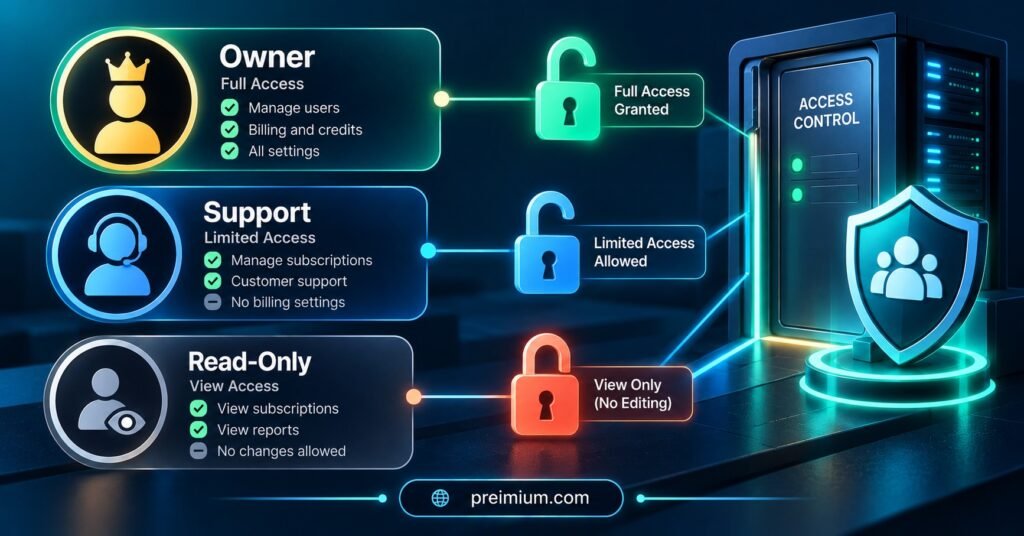
Most small operations need three or four roles, not a dozen. A layout like this covers the usual jobs without getting fiddly.
| Role | What it usually needs | What to keep away from it |
|---|---|---|
| Owner | Everything, including role changes and security settings | Daily support work, which should use a separate everyday login |
| Support agent | Search customers, check line status, reset sessions, add notes | Deleting lines, spending or moving credits, exporting full customer lists |
| Renewals and sales | Create trials, renew and create lines within an agreed allowance | Deletion, bulk edits, anything involving staff accounts |
| Read-only reviewer | View lines, usage and reports | Any change at all |
The owner row deserves a second look. The owner account should exist mostly to manage the system, so the person who holds it should do their daily work from a lesser account. If that owner login is ever phished or left logged in on a shared computer, the damage is limited to what a routine account can do rather than the whole business.
A read-only role is easy to overlook and very useful. It lets a bookkeeper, a partner or a new starter look at lines and reports without any risk of changing them, which pairs well with the numbers you would track on an IPTV reseller panel KPI dashboard.
Credits deserve the strictest control
Credits are money held as stock, and almost every permission that spends them is hard to reverse. Renewing the wrong line costs a credit immediately. Moving credits to a sub-reseller shifts value out of your own balance. A panel with loose spending rights can lose real money without a single customer complaint to warn you.
The practical controls are simple. Keep purchasing and transferring credits with the owner only. Let renewals staff spend, but tie each renewal to a payment you have actually received. Then compare credits used against payments collected on a regular basis, which is much easier if you already run a periodic IPTV reseller line audit to confirm which lines are active and who should be paying for them.
Pro tip: Ask whoever renews a line to write the payment reference in the customer note at the same moment. Matching credit spend to money received later then takes minutes instead of detective work.
When the panel only has two levels
Plenty of panels do not offer custom staff roles. That does not mean you have to hand over the owner login. Start by asking your provider whether limited staff accounts or restricted sub-accounts exist, because features are sometimes there but poorly documented.
If the only extra tier is a sub-reseller account, a staff member can sometimes work inside one with a small credit balance loaded by you. That caps what a mistake can cost. Before relying on it, check two things: whether that account can see more customer data than the person needs, and whether you can take unused credits back.
If neither option exists, keep the team small, write down who is allowed to do what, and treat the owner password as something that changes whenever anyone who knew it moves on. A written rule is weaker than a technical limit, but it is far better than an unspoken one.
Sub-resellers need a different kind of boundary
Staff work for you. Sub-resellers run their own businesses and buy from yours, so the questions change from “what should this person be able to click” to “where does my responsibility end and theirs begin”.
Settle these points before you create the account. Who owns the customer relationship and handles first-line support? Can you see their customers’ lines, and do they know that? How is a credit allocation agreed, and how does unused credit return if the arrangement ends? Can they create further sub-resellers beneath themselves, and if so, how deep can the chain go? Because their customers’ lines normally sit beneath your account, a problem at your level can reach them, so say that plainly in whatever terms you share with them.
Pro tip: Begin each new sub-reseller with a modest credit allocation and widen it only after a few clean renewal cycles. Trust built on evidence is easier to defend than trust given on the first day.
Leavers, role changes and the first hour after someone goes
When someone leaves, disable their login before anything else, then look at their recent activity for anything unexpected. After that, change any passwords they may have known, such as shared support mailboxes or messaging accounts. If their second sign-in factor lived on a personal phone, make sure it is removed from the account, which is covered in more detail in our piece on IPTV reseller panel 2FA.
Role changes get less attention but cause the same problem in slow motion. A person who moves from support to renewals should lose the old rights as they gain the new ones. Stacked permissions are how an ordinary assistant ends up with access nobody remembers granting.
A review routine people actually keep
A short monthly check beats an annual overhaul that never happens. List every user, their role and when they last signed in. Remove anyone dormant. Compare the list against the people who currently work with you. Glance at recent credit movements and at any new sub-reseller accounts you do not recall creating. Ten or fifteen minutes is usually enough once the habit is in place.
Write the result down. Roles are part of your configuration, so store the current list alongside your panel data backup notes. If you ever have to rebuild after a problem, you will know who held which rights instead of reconstructing it from memory.

Frequently Asked Questions
How many roles does a small IPTV reseller team need?
Usually three or four: an owner, a support role, a renewals role and, if useful, a read-only role. More than that tends to create confusion about who can do what without adding real protection.
Should support staff be allowed to renew lines?
Only if each renewal is tied to a confirmed payment. If that link is not reliable, let support check status and add notes, and pass renewals to a person who handles payments.
Can I give a temporary helper access for a busy weekend?
Create a separate login with a narrow role and switch it off afterwards. If your panel cannot do that, it is safer to handle the extra work yourself than to lend out the owner login, even briefly.
What is the difference between a staff role and a sub-reseller account?
A staff role lets someone work inside your business under your rules. A sub-reseller account represents a separate business that buys credits from you and manages its own customers, so the boundaries, support duties and credit arrangements need to be agreed in advance.
How often should access be reviewed?
A quick check once a month works for most small operations, plus an immediate review whenever someone joins, leaves or changes job.
Conclusion
Good IPTV Reseller Panel Roles and Permissions are not complicated. Each person gets their own login, the owner account stays in the background, credit spending and transfers sit with as few people as possible, and sub-resellers are treated as separate businesses with written boundaries. The real limit is what your panel can enforce, so ask your provider what is available and fill any gap with clear written rules and a short monthly review. A sensible next step today is to list everyone who currently has access and compare it with what each person actually does.
Reseller Access Checklist
- Every person who touches the panel has an individual login
- The owner account is kept for administration, with a separate everyday login for routine work
- Buying and transferring credits is limited to the owner
- Renewals are matched to a recorded payment
- Staff cannot export full customer lists unless their job requires it
- Each sub-reseller has agreed terms covering support, visibility and returning unused credit
- A leaver routine exists, with the login disabled first
- A monthly review date is in the diary and the role list is stored with your backup notes