A dependable IPTV Reseller Bulk Renewal Workflow does three things in a fixed order: it confirms who has actually paid, it checks that your credit balance covers every renewal in the batch, and only then does it extend the lines inside the panel, followed by an audit that compares the new expiry dates against your own records. Get that order wrong, usually by extending lines first and reconciling later, and you end up with renewed accounts nobody paid for, paid customers who were missed, or a batch that stalls halfway because the credits ran out.
Most renewal trouble does not come from the panel itself. It comes from the gap between the dashboard and the spreadsheet, WhatsApp thread or payment app where you track who has paid. A panel can extend a line in seconds, but it has no idea whether the customer chose one month or twelve, or whether their payment cleared this morning. The workflow exists to close that gap before you spend a single credit.
What an IPTV Reseller Bulk Renewal Workflow Actually Covers
Bulk renewal simply means handling a group of expiring customer lines in one planned session rather than one at a time as messages arrive. For a reseller with 20 customers, renewing individually is manageable. Past a few dozen, expiry dates start clustering, especially if you ran a promotion or onboarded a wave of customers in the same week, and ad hoc renewals become the main source of errors.
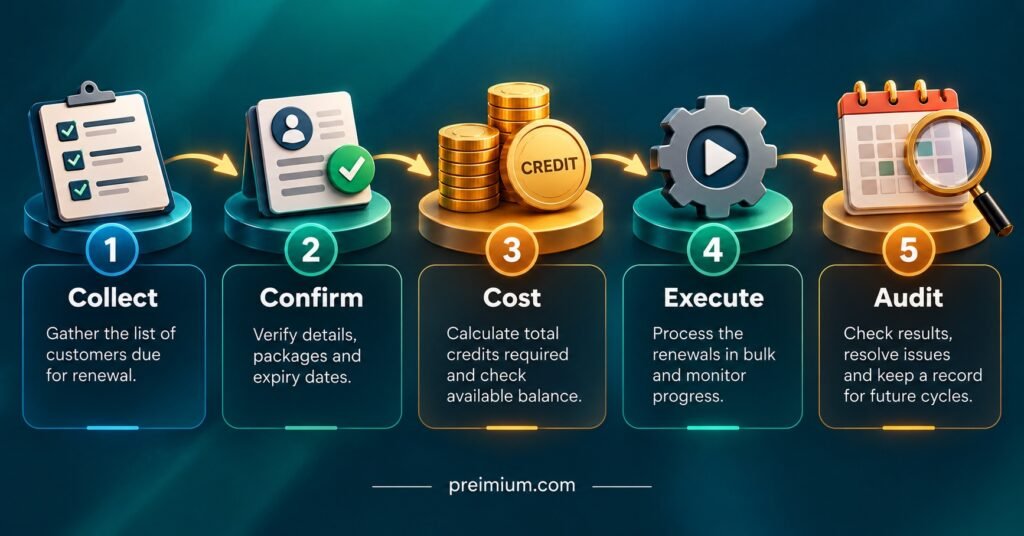
The workflow covers everything around the click, not just the click. In practice that means five stages:
- Collect: build a list of every line expiring within your renewal window.
- Confirm: match each line to a cleared payment and a chosen package length.
- Cost: total the credits required and compare with your available balance.
- Execute: extend the lines in the panel in a controlled order.
- Audit: verify the new expiry dates, the credit deduction and the customer notifications.
It is worth knowing how your own panel behaves before you design around it. Some reseller dashboards offer a mass edit or multi-select extension feature, while others only allow line-by-line extensions, so “bulk” may describe your process rather than a single button. Panels also differ in how they calculate the new expiry date. On many systems, extending an active line adds time to its current expiry date, but a line that has already lapsed may be extended from the day you renew instead. If your provider’s documentation does not state this clearly, test it on one line before running a batch, because it changes how you handle late payers.
Credits sit at the centre of all this. Each extension deducts credits according to your provider’s pricing for that package length, and that rate varies between providers. If you are still getting to grips with how credits are deducted, the breakdown of how an Xtream UI panel handles credits and expiry is a useful companion to this guide.
Running the Renewal Cycle in Practice
The steps below assume a weekly renewal session, which suits most small and mid-sized IPTV panel reseller operations. Larger operations may run it twice a week. What matters is that it happens on a fixed day, so customers learn when renewals are processed and you stop handling them piecemeal at midnight.
Set a renewal window and a cut-off
Pick a window that gives customers time to pay before their service stops. A seven to ten day look-ahead works for most resellers: every line expiring in that period goes on this week’s list. Then set a payment cut-off a day before your renewal session. Anyone who pays after the cut-off goes into the next session, or gets handled as a single late renewal, but never squeezed into a batch that has already been costed.
Export the expiring lines
Pull the list of lines expiring in your window from the panel. Many dashboards let you filter or sort by expiry date; if yours offers an export, use it rather than copying names by hand. Your list should include the username or line ID, current expiry date, connection count and package. Line IDs matter more than names, because two customers called “Dave” will eventually cause a mix-up.
Match payments to lines
Now bring in your payment records. For each line, mark one of four statuses: paid, awaiting payment, cancelled, or changing plan. Note the package length each paid customer chose. This is the stage people rush, and it is where most bulk renewal errors begin. A customer who paid for three months but was marked as one month in your sheet will cost you a support conversation and possibly a refund.
Cost the batch before touching the panel
Total the credits needed for every paid line at its chosen package length, then compare against your available balance. If you run sub-resellers, check whether any of their customers are in your batch, or whether they renew from their own allocated credits. A batch that runs out of credits halfway through is messy: some customers renewed, some not, and you have to work out exactly where it stopped.
Execute in a fixed order
Renew in order of expiry date, earliest first. If something interrupts the session, the customers closest to losing service are already done. Tick each line off your list as you extend it, rather than at the end. If your panel supports multi-select extension, group lines by package length so each bulk action applies one duration to one group.
Audit, then notify
Once the batch is done, re-export the same lines and compare the new expiry dates against what you expected. Check that the credits deducted match your costing total. Only then send renewal confirmations, ideally stating the new expiry date so the customer has it in writing. Notifying before the audit means that if you find an error, you are correcting something the customer already believes is settled.
Pro tip: Keep a short renewal log for each session: date, number of lines renewed, credits before, credits after, and any exceptions. When a customer disputes a renewal three months later, that log answers it in seconds.
A Worked Example: 64 Lines Expiring in One Week
The figures here are illustrative. They assume a provider rate of one credit per month of service with no discount for longer packages, which is a common structure but not universal, so substitute your own provider’s rates.
A IPTV panel reseller runs their renewal session every Thursday. On Thursday morning, the panel shows 64 lines expiring between Friday and the following Thursday. After matching payments, the list breaks down like this:
| Renewal group | Lines | Credits needed |
|---|---|---|
| Paid, 1-month package | 30 | 30 |
| Paid, 3-month package | 16 | 48 |
| Paid, 12-month package | 6 | 72 |
| Awaiting payment | 8 | 0 (not yet) |
| Cancelled | 4 | 0 |
| Total to renew today | 52 | 150 |
The panel balance is 140 credits. The batch is 10 credits short.
This is exactly why costing comes before execution. Without that step, the reseller would have started renewing, worked through the one-month and three-month lines, and then found themselves unable to complete the annual renewals, which are the highest-value customers in the batch. Instead, they have two clean options: top up credits before starting, or renew in expiry order and hold the last lines until the top-up arrives, telling those customers in advance.
Two further issues surface during the payment match. One customer paid for three months, but the payment note says “same as last time” and last time was one month. That line gets flagged and held for a quick confirmation message rather than guessed. Another customer wants to move from two connections to three. Depending on the panel, a connection change may need to be made as an edit to the line or may carry a different credit cost, so it is handled separately after the main batch rather than mixed into it.
After the renewals, the reseller re-exports the 52 lines. Fifty-one show the expected new expiry date. One annual line shows an expiry just one month ahead: the wrong package was selected during a multi-select action that mixed durations. Because the audit happened before customer notifications went out, the fix is a quiet correction rather than a complaint. The credits-used figure is then checked against the planned 150, and the log is updated.
The eight unpaid customers get a reminder that their service ends on their expiry date and that payments received by Wednesday’s cut-off will be included in next week’s session.

Errors That Quietly Cost Credits and Customers
Renewing before the payment clears. Bank transfers and some payment apps can show a payment as sent before it actually lands. Renew against cleared funds only, or accept that some renewals will occasionally go unpaid.
Mixing package lengths in one bulk action. Multi-select tools usually apply one duration to every selected line. Group by package length first, or you will produce the annual-line error from the example above.
Treating cancelled lines as an afterthought. If a customer cancels, note it in your records the day they tell you. Otherwise, the line appears on next week’s expiry list again and someone has to remember the conversation.
Ignoring sub-reseller overlap. If a sub-reseller manages some customers under your panel, agree in writing who renews which lines. Two people extending the same line from different balances wastes credits, and recovering them depends entirely on your provider.
Skipping the post-renewal check because the panel “said success”. A success message confirms the panel accepted the action, not that you selected the right line or duration. The audit is the only thing that catches human selection errors.
Leaving panel access loose. Bulk actions are powerful, which makes a compromised or shared login more damaging. Strong unique passwords and two-factor authentication, where your panel offers it, matter more once you start renewing in volume. The guide to reseller panel security basics covers this in more detail.
If your credit balance or line statuses ever look wrong after a session, the walkthrough on credit sync issues and other common panel problems covers what to check before contacting your provider.
Post-Renewal Audit Checklist
Run this after every session, before customer notifications go out:
- The number of lines renewed matches the number marked as paid
- Every renewed line shows the expiry date expected for its package length
- Credits deducted equal the total calculated during costing
- No cancelled or unpaid line was extended by mistake
- Held lines (unclear package, plan changes) have an open note and a follow-up date
- Sub-reseller lines were renewed by the agreed person only
- The renewal log records date, line count, credits before and credits after
- Confirmation messages state each customer’s new expiry date
Questions Resellers Ask About Bulk Renewals
Should I renew lines early, before they expire?
On panels that add time to the current expiry date, early renewal costs the customer nothing and removes the risk of a service gap. Check your panel’s behaviour first, though, because a system that calculates from the renewal date would cut short the time the customer already paid for.
How do I handle a customer who pays after the line has expired?
Treat it as a single late renewal outside the batch. Confirm how your panel calculates expiry for lapsed lines, and tell the customer their new expiry date clearly, since it may differ from their old renewal cycle.
Is it better to run renewals weekly or daily?
Weekly suits most UK IPTV panel resellers below a few hundred lines because it concentrates checking into one focused session. Daily sessions make sense once volume is high enough that a week’s expiries become a long list, but each daily session still needs the full confirm, cost and audit steps.
Can a bulk renewal be reversed if I make a mistake?
That depends entirely on your provider. Some panels allow an extension to be edited back, while credit refunds for mistaken renewals are at the provider’s discretion. This is why the audit happens before notifications and why costing happens before execution.
Do I need a separate record if the panel already stores everything?
Yes. The panel records what was done, not what the customer agreed to or paid for. Your own record, kept securely and limited to what you genuinely need to manage the service, is what lets you prove a renewal was correct.
A final point worth stating plainly: IPTV is a delivery technology, and a well-run renewal process does not change the licensing position of the content a service carries. Resellers should be confident that their provider holds the appropriate distribution rights for what is offered.
Making the Process Routine
An IPTV Reseller Bulk Renewal Workflow earns its value through repetition. The first session takes longer because you are building the spreadsheet columns, learning how your panel exports and calculates expiry, and writing the confirmation template. By the third or fourth week, the confirm and cost stages take minutes, and the audit becomes the habit that catches the one wrong click before a customer ever sees it.
If you only change one thing this week, move the credit check ahead of the first extension. It is the step that prevents half-finished batches, and everything else in the cycle becomes easier once you know in advance exactly what a session will cost.