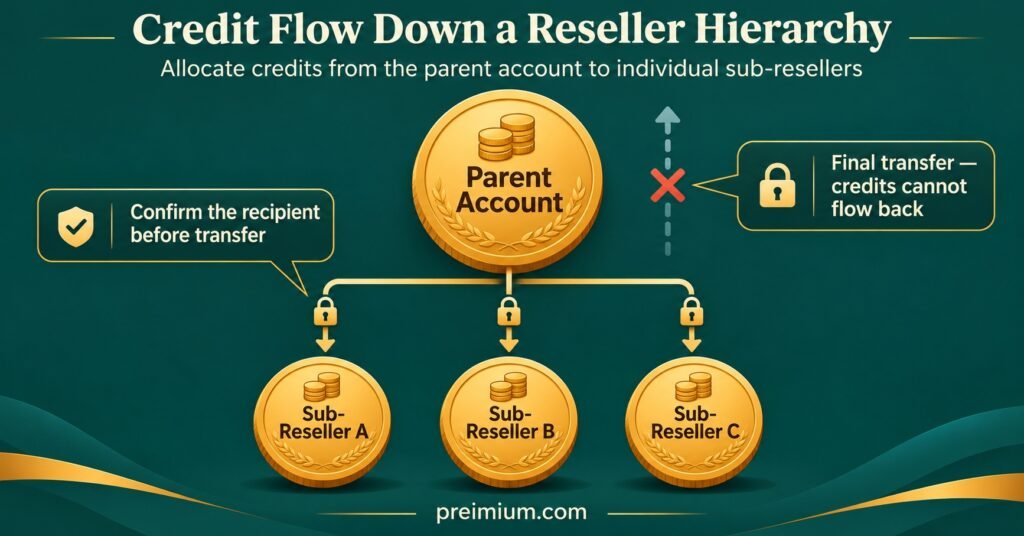
IPTV Reseller Credit Transfer Rules decide three things on almost every panel: which direction credits can move, whether a transfer can be undone, and who is allowed to send them. In most IPTV panel reseller dashboards, credits flow one way, from a parent account down to a sub-reseller, and the deduction happens the moment you confirm. Send 50 credits to the wrong sub-account and the panel usually won’t let you pull them back yourself. You’ll need the receiving reseller to cooperate or the provider’s admin team to step in, and some providers won’t reverse a completed transfer at all.
That finality is why the panel’s built-in limits are only half the picture. The software stops you sending credits you don’t have, but it won’t stop you sending them before a sub-reseller has paid, to an account with a near-identical username, or without a record that matches your bank statement. Those gaps are closed by rules you set for your own operation: a cleared-payment check before every transfer, a second look at the recipient, and a ledger entry you can reconcile at the end of each month.
What IPTV Reseller Credit Transfer Rules Actually Cover
A credit is the unit your IPTV provider uses to measure access. You buy credits in bulk, and the panel deducts them when you create or renew a customer line, usually in proportion to the subscription length. A credit transfer is something different: it moves part of your balance into another account in your hierarchy, normally a sub-reseller you’ve created, so they can create lines of their own.
It helps to keep three movements separate in your head, because they behave differently:
- Purchasing adds credits to your balance from the provider.
- Spending removes credits when you create or extend a line.
- Transferring moves credits from your balance to another reseller’s balance.
The operational problem sits in that third movement. Credits are prepaid stock. By the time you transfer them, you’ve already paid the provider for them, so every transfer is a handover of money you’ve spent. If the sub-reseller hasn’t paid you, disputes the price, or stops trading with a full balance, the loss is yours. And because most panels treat a transfer as final, mistakes don’t fix themselves.
One point is worth stating plainly. Credits buy access to a provider’s service through a panel; they don’t establish that the provider holds distribution rights for what it delivers. IPTV is a delivery technology, and legitimate operation depends on the content being properly licensed. A smooth credit system tells you nothing about licensing, so that question deserves its own check before you build a sub-reseller network on top of it.
If you’re still weighing up which panel to run your network on, it’s worth reading about what a modern IPTV reseller panel should offer smart resellers before you commit credits to it.
Rules the Panel Enforces and Rules You Have to Write
Some transfer rules are hard-coded into the reseller dashboard. Others are set by the provider and applied by its admin team. The rest don’t exist unless you create them. Exact behaviour varies between providers and panel software, so treat the table below as a list of questions to confirm rather than a description of every system.
| Rule | Usually set by | What to confirm |
|---|---|---|
| Credits move downward only | Panel software | Whether a sub-reseller can ever return credits |
| Transfer needs sufficient balance | Panel software | Whether pending or trial lines reserve credits |
| Minimum to open or top up a sub-reseller | Provider | The exact figure and whether it applies to top-ups |
| Reversal of a completed transfer | Provider admin | Whether it’s possible, how to request it, how long it takes |
| Expiry of transferred credits | Provider | Whether expiry follows the original purchase date |
| Payment before transfer | You | What counts as cleared payment |
| Who may send transfers | You | Which team logins have the permission |
The first five you can only learn from the provider, ideally in writing. Ask before you create your first sub-reseller, not after something has gone wrong, because the answer to “can you reverse this?” changes how careful you need to be.
The last two are entirely yours. Payment-before-transfer sounds obvious, yet it’s the rule most often bent for a trusted sub-reseller who promises to pay at the weekend. Permission control matters just as much. If your panel lets you create staff or support logins, the ability to transfer credits should normally stay with the account owner. A support assistant who resets passwords and checks expiry dates rarely needs to move balance. Tools that automate user management and billing control can reduce how often anyone touches balances manually, which shrinks the room for error.
A Realistic Transfer Workflow, Step by Step
The sequence below assumes a standard panel where you, as the parent reseller, send credits to sub-resellers who pay you directly. It takes a minute or two per transfer once it’s habit, and it’s the minute that prevents most disputes.
1. Take the request in writing
Get the sub-reseller’s request in a message you can find later: their panel username, the number of credits, and the agreed price per credit. A verbal “send me fifty” on a call leaves nothing to point to if the invoice is disputed.
2. Confirm payment has actually cleared
A payment screenshot is not cleared money. Check your own bank, payment processor, or wallet and match the amount and reference. For newer sub-resellers, wait until the funds are settled rather than pending.
3. Check your balance against your own commitments
The panel will tell you whether you have enough credits for the transfer. It won’t tell you whether you’ll still have enough for your own customers’ renewals this week. Leave a working reserve before you send anything.
4. Verify the recipient account
Select the sub-reseller from your list by checking the full username or account ID, not by trusting the first match in a search box. Similar usernames such as “jay_media” and “jay_media2” are a classic source of misdirected credits.
5. Enter the amount and read it back
Type the number, then read it once more before confirming. An extra zero turns 50 into 500, and if your balance can cover it, the panel will happily process it.
6. Record the transfer immediately
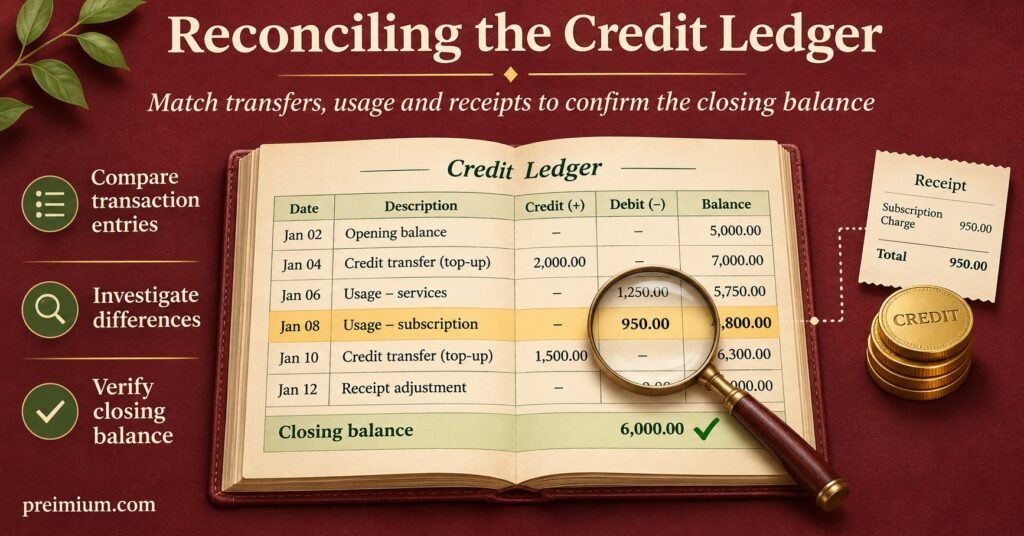
Write the entry in your own ledger straight away: date and time, recipient, credits sent, price, payment reference, panel transaction ID if one is shown, and your balance afterwards. Doing it later, from memory, is how ledgers drift away from reality.
7. Ask the sub-reseller to confirm receipt
A short message asking them to confirm their new balance closes the loop. If they report a different figure, you’ll catch the problem the same day rather than at month end.
Pro tip: Export or screenshot your panel’s transaction history at the end of each week and file it beside your ledger. If a provider later changes or removes history views, you still hold your own evidence.
Worked Example: One Week of Transfers on a 300-Credit Balance
The following is a hypothetical illustration, not a real business or real provider pricing. Assume a parent IPTV reseller called Northgate Media buys credits at £3.00 each and sells them to sub-resellers at £3.80. It starts the week with 300 credits and two sub-resellers who have requested balance, plus one renewal for its own customer.
| Movement | Credits | Balance after |
|---|---|---|
| Opening balance | 0 | 300 |
| Transfer to Sub A, £190 cleared | −50 | 250 |
| Own customer, 12-month line | −12 | 238 |
| Sub B’s credits sent to Sub C in error | −30 | 208 |
| Provider admin reverses the error | +30 | 238 |
| Transfer to Sub B, correct account, £114 cleared | −30 | 208 |
The first transfer is textbook. Sub A asked in writing for 50 credits, paid £190, Northgate checked the funds had cleared, sent the credits, and logged the entry.
The third row is where things went wrong. Sub B had paid £114 for 30 credits, but Northgate selected Sub C, whose username differed by a single character. The panel processed it instantly. Because the panel didn’t allow Northgate to pull credits back, it contacted the provider with the transaction details and requested a reversal. In this example, the provider approved it, so the balance returned to 238 and the correct transfer went to Sub B.
Now consider the version where the provider refuses. Northgate would be 30 credits short, worth £90 at its own cost, and it would still owe Sub B the 30 credits already paid for. Its only route back would be persuading Sub C to cooperate, which isn’t always possible. That single slip would wipe out more than the margin earned on both legitimate transfers combined.
Reconciliation at the end of the week is straightforward because every movement was logged:
- Credits out: 50 (Sub A) + 12 (own line) + 30 (Sub B) = 92
- Expected balance: 300 minus 92 = 208, matching the panel
- Payments received: £190 + £114 = £304 for 80 credits
- Cost of those credits: 80 × £3.00 = £240
- Gross margin on transfers: £64
The ledger, not the panel, is what let Northgate prove the error to the provider, show Sub B its payment was honoured, and confirm the week’s margin in a few minutes.
Errors That Quietly Cost Resellers Credits
Most losses don’t come from dramatic fraud. They come from small habits that seem harmless until the day they aren’t.
Transferring on a promise. A sub-reseller who has always paid on time asks for credits now and payment tomorrow. Once that becomes routine, you’re extending unsecured credit, and you’ll only find out how much when one of them stops replying.
Accepting screenshots as proof. Payment screenshots are easy to edit and easy to reuse. Your bank or payment account is the only reliable source.
Letting staff move balance. If a support login can transfer credits, any compromised password or honest slip can drain your stock. Keep transfer rights with the owner account unless there’s a clear reason otherwise.
Forgetting your own renewals. Sending a large batch to sub-resellers and then finding you can’t renew your own customers’ lines puts your direct customers at risk of interruption, and that damages trust far more than a delayed top-up would. Good support depends on having the balance to act, a point that ties closely to why customer service drives reseller success.
Assuming credits come back when a sub-reseller leaves. On many panels, a sub-reseller’s unused balance stays in their account. Whether the provider will move it back to you is a provider decision, and some won’t. Agree in advance what happens to unused credits if the relationship ends.
Leaving the internal price unwritten. If the per-credit price you charge sub-resellers lives only in old chat messages, disputes are inevitable. Set it deliberately and record it; your approach to pricing strategy and profit margins should cover the sub-reseller tier as well as retail.
Ignoring the provider’s own terms. Some providers only permit sub-reseller creation once it’s been unlocked, or set minimum balances for new sub-accounts. Working around those terms can put your own panel access at risk.
Monthly Credit Transfer Audit Checklist
Run this once a month, ideally on the same date, with your ledger and the panel’s transaction history side by side.
- Opening balance plus purchases, minus transfers and line creations, equals the panel’s current balance
- Every outgoing transfer in the panel history has a matching ledger entry
- Every ledger transfer has a matching cleared payment and reference
- No transfer was sent before its payment cleared, or any exceptions are noted with a reason
- Each sub-reseller has confirmed their balance at least once this month
- Any reversal requests sent to the provider are resolved and logged
- Transfer permission is still limited to the logins that genuinely need it
- Sub-resellers who have stopped trading are identified, with their remaining balance recorded
- The agreed internal price per credit is current and written down for each sub-reseller
- The provider’s minimums, reversal policy and expiry terms haven’t changed since last month
Questions Resellers Ask About Moving Credits
Can a sub-reseller send credits back to me?
On most panels, no. Transfers are designed to flow downward, so a return usually needs the provider’s admin team to adjust balances manually. Ask your provider whether they offer this and under what conditions.
What happens to transferred credits if a sub-reseller stops trading?
The credits normally stay in their account, and they may keep using them. Whether you can reclaim them depends on your provider’s policy and any agreement you made with the sub-reseller. Put that agreement in writing before the first transfer.
Do transferred credits keep their original expiry terms?
Many providers advertise credits that don’t expire, but terms differ and can change. If expiry applies, confirm whether it follows your original purchase date or resets on transfer, and tell your sub-resellers so they aren’t caught out.
Should I ever transfer credits before payment?
It’s a business decision, but treat it as lending money. If you do it, set a cap per sub-reseller, record the amount owed, and stop further transfers until it’s settled.
Is the panel’s transaction history enough of a record?
It’s useful evidence, but it rarely shows payment references, agreed prices or the reason for a transfer. Keep your own ledger as the primary record and use the panel history to verify it.
Before You Send the Next Batch
IPTV Reseller Credit Transfer Rules come in two layers. The first is what your panel and provider enforce: direction, balance limits, minimums and whether anything can be reversed. The second is what you enforce yourself: cleared payment first, a verified recipient, restricted permissions and a ledger written at the moment of transfer. The first layer varies between providers, so confirm it in writing. The second layer is entirely within your control, and it’s where most avoidable losses are stopped. A sensible next step is to ask your provider about reversals today, then run the audit checklist against last month’s transfers to see how closely your records match the panel.