IPTV Reseller Panel Access Recovery almost never starts with a “forgot password” link. It starts with working out who sits one level above your login, because only that party (your provider, or your parent reseller if you’re a sub-reseller) can confirm you own the account and reset it. Before you contact them, stop trying to log in, note the exact error message, and gather proof of ownership: your panel username, the email it was registered with, and a recent credit purchase reference. Those three details usually decide whether recovery takes an hour or several days.
The good news is that a locked dashboard doesn’t normally switch off the subscriptions you’ve already created. On most panels, customer lines live on the provider’s side and keep running to their expiry dates whether you can log in or not. What you lose is control: you can’t renew, extend, add connections, or check a customer’s status when they message you. So the real deadline isn’t “as soon as possible”. It’s the first expiry date in your customer list, and knowing that date changes how calmly you can handle the next few hours.
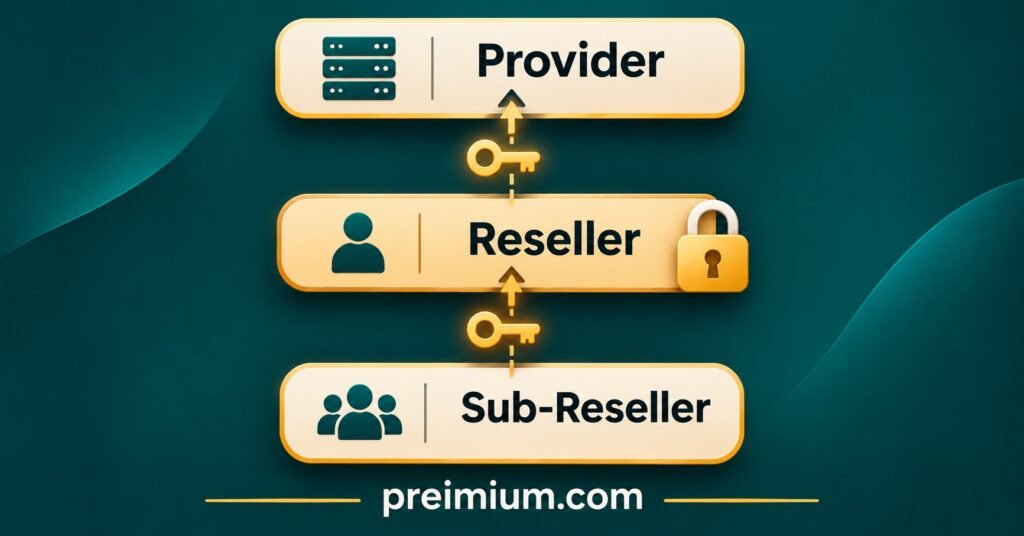
Who Holds the Keys Above Your Login
Every reseller panel sits inside an access chain. The provider runs the platform and issues reseller accounts. A reseller buys credits and creates customer lines. A sub-reseller, if there is one, works inside an account created by a reseller and draws credits from that reseller’s balance.
Recovery always moves one step up that chain. A provider can reset a reseller’s login. A reseller can usually reset a sub-reseller’s login from their own dashboard. A sub-reseller generally can’t go over their parent’s head to the provider, because the provider has no record of them as a direct client. That’s the first thing to establish when you’re locked out, and it’s the step people most often skip in a panic.
This also explains why recovery is slower than for a normal online account. There’s no automated identity check tied to your bank or phone in most cases. A person on the provider’s support side has to decide that you are the genuine account holder and not someone who has bought a leaked username and wants the credits on it. The evidence you send is what lets them make that decision quickly.
If your account was set up properly, you’ll already know your access structure. Our guide to panel roles and permissions for small teams covers how master logins, staff logins and sub-reseller accounts should be separated, and that separation matters a great deal once something goes wrong.
Reading the Lockout Before You Act
Not every failed login is the same problem. The message on screen, and what happened just before, usually points to the cause. Use this to decide who can actually fix it.
| What you see | Likely cause | Who can fix it |
|---|---|---|
| “Invalid username or password” after a recent change | Typo, saved old password, or wrong panel URL | You, by checking the exact URL and credentials |
| Login works but a verification code is requested and you can’t receive it | Lost phone or authenticator app | Provider, after ownership checks |
| “Too many attempts” or the page stops loading for you only | Temporary lockout or IP block after repeated failures | Waiting it out, or provider support |
| “Account disabled” or “suspended” | Policy action, payment dispute, or suspected misuse | Provider, and only once the reason is resolved |
| Panel won’t load for anyone, including staff | Maintenance or a platform outage | Provider, no recovery needed |
| Sub-reseller login rejected, parent’s login fine | Parent changed or disabled the sub-account | Parent reseller |
Two rows deserve extra care. A suspension isn’t a lost password, and treating it like one wastes time; the provider will want to talk about why the account was restricted before restoring access. An outage isn’t a recovery case at all, so check with a colleague or another device before you start sending identity documents to support.
Pro tip: Write down the exact error wording and the time it first appeared. Support teams often look up logs by time, and “it won’t let me in” gives them nothing to search for.
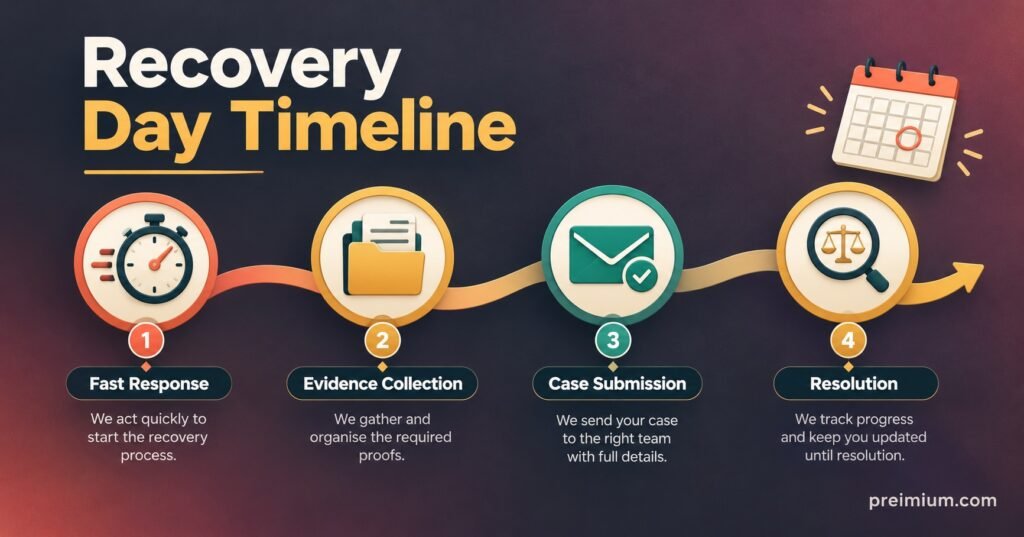
The IPTV Reseller Panel Access Recovery Workflow, Step by Step
The workflow below is written for a reseller dealing with their provider. Sub-resellers follow the same logic but contact their parent reseller panel instead, which we come back to further down.
Stage one: stop and protect what you have (first 15 minutes)
Stop logging in. Some panels lock an account or block an IP address after a run of failed attempts, and every extra try can extend that window. If you suspect someone else has your password, change the password on the email account linked to the panel first, because that email is usually the route a reset will travel through.
Then open your customer records, wherever you keep them, and find the earliest upcoming expiry. That date sets your real deadline.
Stage two: build your ownership evidence (next 30 minutes)
Providers vary in what they ask for, but the strongest evidence tends to be information only the genuine account holder would have:
- The panel username and the exact login URL you use
- The registration email address, and ideally an old message from the provider sent to it
- A transaction reference or receipt for a recent credit purchase
- Two or three usernames of customer lines or sub-accounts you created
- Your approximate credit balance and the date you last logged in successfully
You don’t need all of these, but having three or four ready means you can answer follow-up questions in one reply rather than five.
Stage three: contact support through the registered channel
Send your request from the email address registered to the account, or through the support channel you’ve used before. A request from a brand new email or an unfamiliar messaging account looks exactly like a takeover attempt, and a careful provider will slow down because of it. That’s a good thing in principle, but it costs you time.
Keep the first message short and factual: who you are, the username, what the error says, when it started, and the evidence you can supply. Mention the earliest expiry date if it’s close, since that helps support prioritise without you needing to chase.
Stage four: verify and reset
Answer verification questions exactly and don’t offer more personal data than is asked for. Once the provider resets access, log in, set a new password you haven’t used anywhere else, and turn on two-factor authentication if the panel offers it. Store the backup or recovery codes somewhere other than the phone you use for the authenticator.
Stage five: check nothing happened while you were out
This is the stage people skip because they’re relieved to be back in. Compare your credit balance with your own records. Look through recent activity for lines you didn’t create, extensions you didn’t make, or sub-accounts that appeared. If the panel shows active sessions or login history, review it and end anything you don’t recognise. If your figures don’t match, tell the provider straight away while the logs are fresh. A dated record of your own dashboard actions, like the one described in our reseller panel change log guide, makes this comparison take minutes instead of guesswork.
A Worked Example: Locked Out the Day Before a Renewal Batch
The following is a hypothetical scenario, built to show how the workflow plays out in practice. The numbers are illustrative.
A small UK IPTV reseller runs 46 active customer lines on a single panel account. Eleven of those lines expire on Friday. On Thursday morning the reseller’s phone, which holds the authenticator app, is replaced, and the old one is wiped. At 9:10 the panel accepts the password but asks for a verification code they can’t generate.
At 9:15 they stop trying and check their customer spreadsheet. The earliest expiry is Friday evening, so they have roughly a day and a half. No customer is affected yet.
By 9:40 they have their evidence together: username, the panel URL, the registration email, the reference from last month’s credit purchase, three customer line usernames, and their own note that the balance stood at 31 credits after Tuesday’s renewals.
At 9:45 they email the provider from the registered address and open a ticket through the provider’s usual support channel, quoting the same details. The provider replies mid-morning asking for the purchase reference and two line usernames. The reseller answers within ten minutes.
Access is reset early in the afternoon. The reseller sets a new password, enables two-factor authentication again, and saves the recovery codes in a password manager on a different device.
Then the check. The panel shows 29 credits, not 31. Recent activity shows a one-month line created at 3:12 that morning under a username the reseller doesn’t recognise. That’s a sign the old password had leaked and someone had tried to use the account before the verification step stopped them going further, or used a session that was still open. The reseller ends all other sessions, reports the line with its creation time to the provider, and asks whether the two credits can be reviewed.
By 4pm all eleven Friday renewals are done. The reseller sends those eleven customers a short message confirming their renewal, without mentioning the lockout, since it never affected their service.
The lesson from the example isn’t the speed. It’s that the reseller knew the expiry date, had the evidence in one place, and checked the balance afterwards. Without the last step, the unknown line would have gone unnoticed and two credits would simply have disappeared.
Recovery Mistakes That Make the Lockout Longer
Hammering the login page. Repeated attempts can turn a five-minute password typo into a temporary block. If two careful tries fail, stop.
Writing from a new email or phone number. It feels quicker to message support from whatever app is open, but an unfamiliar contact looks like a takeover. Use the channel tied to the account.
Opening a second panel account and rebuilding customers. This is the costly one. You spend new credits recreating lines that still exist on the original account, customers can end up with duplicate logins, and the original credit balance is still locked away when you get back in.
Paying a stranger who offers to “recover” panels. Resellers in online groups sometimes advertise unlocking services. At best they’re asking for your credentials; at worst they’re the reason accounts get compromised. Only the provider (or your parent reseller) can legitimately restore access.
Sharing the master login with staff. If three people use one password, you can’t tell who changed what, and a single leak locks everyone out. Separate staff and sub-reseller logins solve both problems.
Skipping the balance check. Getting back in feels like the end of the incident. It isn’t until you’ve confirmed the credits and activity match your records. If you move credits between your own accounts and sub-resellers, our article on credit transfer rules between reseller accounts explains what a normal transfer trail should look like, which helps you spot one that isn’t.
When You’re a Sub-Reseller, the Route Is Shorter but Narrower
A sub-reseller’s account belongs, in practical terms, to the reseller who created it. That reseller can usually reset the password or re-enable the account from their own dashboard in a few clicks, so recovery can be very quick when the relationship is good.
The narrow part is that you have no independent route. If your parent reseller is unresponsive, or has disabled the account deliberately, the provider is unlikely to step in on your behalf. That’s worth thinking about before you build a large customer base under someone else’s account. Ask your parent reseller, while everything is working, how they handle lost logins and how fast they typically respond.
Getting access back also doesn’t change anything about where the service comes from. IPTV is a delivery technology, and whether a service is lawful depends on the distribution rights behind it, not on how professional the panel looks. If a recovery conversation reveals that your provider can’t explain basic account security, it’s reasonable to ask what else they can’t explain.
Audit Checklist: Could You Recover Access Tomorrow?
Run through this while you still have access. Each item shortens a future lockout.
- Login URL saved exactly, including the full domain, not just a bookmark on one device
- Registration email confirmed as one you still control, with its own strong password
- Two-factor authentication enabled, with recovery codes stored away from the authenticator phone
- Master login used by you only; staff and sub-resellers on their own accounts
- Last three credit purchase references kept in one folder you can open from any device
- Customer list with expiry dates held outside the panel, updated after each renewal batch
- Current credit balance recorded after every significant change
- Provider’s support channel and typical response route noted, plus a backup contact if one exists
- Sub-resellers told how to reach you if their login fails
- Active sessions or login history reviewed monthly where the panel shows them
If you can tick every line, you’ve moved most of the recovery work to a calm day instead of a stressful one.
Frequently Asked Questions
Will my customers lose service while I’m locked out of the panel?
Usually not. On most panels, lines keep running until their own expiry dates. The risk is that a line reaches its expiry while you can’t renew it, so check your earliest upcoming date and tell your provider if it’s close.
Can my provider see my customers’ passwords during recovery?
Providers can generally see the line details held on their platform, since they run it. Recovery itself shouldn’t require you to share customer credentials, and you shouldn’t send them in a support message.
How long does recovery normally take?
It depends entirely on the provider and on how quickly you can prove ownership. There’s no standard timescale across the industry. Having your evidence ready before you make contact is the biggest factor you control.
My account was suspended, not locked. Is that the same process?
No. A suspension is a policy decision, so the provider will want to resolve the reason first. Ask what triggered it and what they need from you, rather than sending a password reset request.
Should an IPTV seller keep a second panel account as a backup?
A second account doesn’t help with recovery, because your customers and credits sit on the first one. A better backup is good records: customer expiry dates, purchase references and your credit balance, kept outside the panel.
Where do I buy credits again if the balance doesn’t match after recovery?
Report the mismatch to your provider first so it can be reviewed. If you then need to top up, you can compare the available reseller credit packs and record the new balance straight away.
Getting Back In, and Staying In
IPTV Reseller Panel Access Recovery comes down to three things you can prepare in advance: knowing who sits above your login, keeping proof that the account is yours, and checking your credits and activity once you’re back. Whether you’re a UK IPTV reseller running a few dozen lines or an IPTV panel reseller managing sub-accounts, the lockout itself is rarely the expensive part. The damage comes from rebuilding customers on a new account, missing a renewal date, or never noticing what happened while you were out. Run the audit checklist this week, while you still have access, and the next lockout becomes an inconvenience rather than a crisis.