It was 8pm on a Friday. A boxing event. The kind of night where half your subscriber base is watching simultaneously and the other half is texting you asking why it isn’t working yet. My panel was fine. My provider swore the servers were fine. But streams were dropping every four to six minutes like clockwork — just long enough for subscribers to think it had fixed itself, then drop again.
Three hours and a very long evening later, the culprit was a CDN routing issue between my provider’s UK edge servers and a specific cluster of postcodes — mostly suburban areas on Virgin Media’s network. Nothing I could have predicted. Nothing I could fix myself. But every one of those affected subscribers blamed their IPTV streaming service. Which meant they blamed me.
I lost seven subscribers that weekend. Learnt more about how IPTV streaming actually works than I had in the previous six months of running the business. And built a redundancy plan the following week that has saved me from repeating that experience.
If you’re serious about running a UK IPTV reseller operation, understanding what sits underneath your streaming service isn’t optional. This guide breaks it down honestly.
Table of Contents
- How IPTV Streaming Actually Works (The Part Most Resellers Skip)
- Why UK IPTV Streaming Fails When It Matters Most
- The Infrastructure That Separates Stable Panels from Unreliable Ones
- Optimising Stream Quality for UK Subscribers
- Managing Subscriber Expectations Around Streaming Issues
- Building Redundancy Into Your Reseller Operation
- IPTV Reseller Success Checklist
How IPTV Streaming Actually Works (The Part Most Resellers Skip)
Most resellers learn the commercial side of IPTV first — credits, pricing, subscriber acquisition. The infrastructure side gets ignored until something breaks. That’s exactly backwards, because understanding how IPTV streaming is delivered is what lets you diagnose problems quickly, choose better providers, and explain issues to subscribers without sounding like you’re making excuses.
IPTV streaming in the UK operates primarily over two delivery methods: HTTP Live Streaming (HLS) and MPEG-TS delivered over UDP. Without going deeper than necessary, HLS is more resilient to network instability and adapts bitrate dynamically — which is why it handles variable home broadband connections better. MPEG-TS over UDP is lower latency and preferred for live sport, but is more sensitive to packet loss. A good UK IPTV panel will use the appropriate method for the content type.
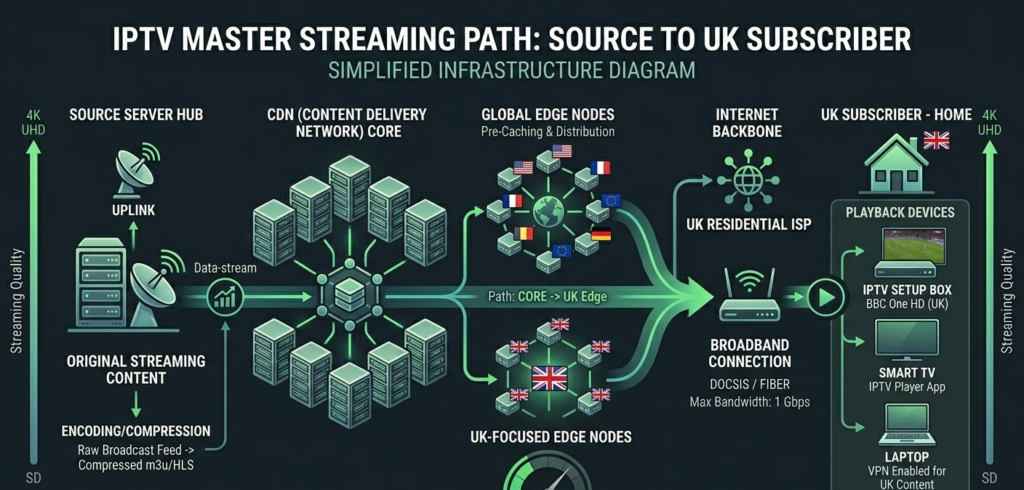
The stream travels from a source, through your provider’s server infrastructure, via a content delivery network to a UK edge point, and then over the subscriber’s ISP connection to their device. There are five or six potential failure points in that chain. As a reseller, you control exactly none of them directly — but knowing where failures typically occur tells you how to respond when they do.
Pro Tip: Ask your provider which CDN they use for UK delivery. A provider who can’t answer that question — or who gives you a vague non-answer — doesn’t have proper infrastructure. Reputable providers use recognised CDN partners with UK points of presence. That answer tells you more about their reliability than any uptime percentage they quote you.
Why UK IPTV Streaming Fails When It Matters Most
This is the pattern every experienced UK reseller recognises: streams are perfectly stable on a Tuesday afternoon. Wednesday evening with a midweek fixture — issues. Saturday from noon onwards during the Premier League schedule — more issues. The problem isn’t random. It’s load-correlated, and it’s predictable once you understand what’s causing it.
Server Overselling
The most common cause of peak-time streaming failure is straightforward overselling. Your provider sells reseller capacity based on theoretical concurrent stream limits, then sells more capacity than the infrastructure can actually support when everyone watches simultaneously. During a major Premier League match, concurrent streams spike dramatically — and if the server capacity isn’t genuinely there, streams degrade or drop.
The tell is that streaming issues are always time-correlated with major events. Random, scattered drop-outs at unpredictable times suggest CDN or routing issues. Consistent degradation every Saturday afternoon suggests overselling.
CDN Routing Problems
Content delivery networks route traffic dynamically based on load and proximity. Sometimes that routing goes wrong — traffic gets sent to a congested node, latency spikes, and streams buffer or drop. This type of failure tends to affect groups of subscribers in the same geographic area or on the same ISP rather than your entire subscriber base.
ISP Throttling
UK broadband providers have become increasingly active in shaping IPTV streaming traffic. Deep packet inspection at the ISP level identifies sustained high-bandwidth streaming patterns and throttles them during peak hours. This is subscriber-specific and connection-specific — one subscriber on Virgin Media in Manchester might be throttled heavily while another on the same ISP in Leeds is unaffected.
Device and App Performance
IPTV streaming places sustained demands on the playback device. Older Firesticks, budget Android boxes with inadequate RAM, and MAG boxes running outdated firmware all struggle with high-bitrate streams in ways that look like server problems. A 4K stream pulling 25–30 Mbps on a device with 1GB of RAM and a CPU from 2019 is going to buffer — not because of your panel, but because the hardware can’t keep up.
Pro Tip: When a subscriber reports buffering, always ask two questions before anything else: what device are they on, and what does their internet speed test show right now. These two data points resolve about 60% of streaming complaints without any panel investigation required.
The Infrastructure That Separates Stable Panels from Unreliable Ones
Not all IPTV panels are built on equivalent infrastructure, and the difference shows exactly when it matters — during high-demand events when streaming load is at its peak.
The infrastructure markers that indicate a genuinely stable streaming operation:
UK-Based or UK-Edge Server Presence
Latency compounds. A stream delivered from a server in Eastern Europe to a UK subscriber travels further, crosses more network hops, and is subject to more potential points of failure than one delivered from a UK or Western European edge server. For live sport where low latency is noticeable, UK server presence is not a luxury — it’s a requirement.
Genuine Anti-Freeze Implementation
Anti-freeze technology works by maintaining a buffer ahead of the current playback position and intelligently switching to a backup stream source when the primary degrades. Implemented properly, the subscriber sees nothing — the switch happens invisibly. Implemented poorly, or not at all, they see a freeze followed by a reconnection delay.
The key word is “genuine.” Some providers list anti-freeze as a feature while running a basic reconnection script that takes four to six seconds to kick in. That’s not anti-freeze — that’s just an automated restart. Real anti-freeze is imperceptible to the viewer.
Redundant Stream Sources
Reliable panels maintain multiple source paths for high-demand content. If the primary source degrades, traffic fails over to a secondary automatically. This redundancy is what keeps streams stable when a single source has issues — which, in a live streaming environment, happens regularly.
Optimising Stream Quality for UK Subscribers
Stream quality optimisation happens at both the provider level and the subscriber level. As a reseller, you influence both — indirectly on the provider side through panel choice, directly on the subscriber side through setup guidance.
Bitrate and Resolution Matching
Not every UK subscriber has a connection that comfortably handles 4K IPTV streaming. A 4K stream at 25–35 Mbps on a 40 Mbps broadband connection leaves almost no headroom for other household usage. During a Saturday afternoon when the rest of the family is also online, that stream will buffer.
The practical formula for assessing subscriber connection suitability:
Available Bandwidth=Total Connection Speed−(Concurrent Device Usage×Avg. Per Device Consumption)Available\ Bandwidth = Total\ Connection\ Speed – (Concurrent\ Device\ Usage \times Avg.\ Per\ Device\ Consumption)
If the available bandwidth after household usage is less than 15 Mbps, a 4K IPTV stream is going to struggle. Recommend HD instead — it’s a better experience on an adequate connection than a 4K stream that buffers every few minutes.
Player App Buffer Settings
Both TiviMate and IPTV Smarters Pro allow adjustment of the player buffer size. Increasing the buffer gives the app more headroom to absorb network fluctuations without the subscriber seeing a visible stall. The trade-off is a slightly longer initial load time and marginally higher RAM usage. For most UK subscribers on variable home broadband — where speeds fluctuate throughout the day — a larger buffer setting meaningfully improves the perceived streaming experience.
Wired vs Wireless Connection
Wi-Fi is convenient but introduces variability that directly affects IPTV streaming stability. A subscriber watching on a Firestick three rooms from their router on a 2.4GHz band is operating with inconsistent signal quality. For subscribers who report persistent buffering that doesn’t respond to other fixes, a powerline ethernet adapter is often the solution — delivering a stable wired connection to a device that doesn’t have an ethernet port.
Pro Tip: Include a connection quality recommendation in your subscriber onboarding. Something simple: “For the best streaming experience, use a wired connection where possible. If using Wi-Fi, ensure you’re on 5GHz and within reasonable range of your router.” This sets expectations and gives you a troubleshooting starting point when issues arise.
Managing Subscriber Expectations Around Streaming Issues
The resellers who retain subscribers longest aren’t necessarily the ones with the fewest streaming problems. They’re the ones who manage expectations effectively and communicate well when issues occur.
In my experience, a subscriber who experiences a streaming problem and receives a prompt, honest, specific response — “we’re aware of an issue affecting streams during this evening’s match, it’s being investigated and here’s what you can try in the meantime” — is significantly less likely to cancel than one who gets silence or a generic “we’re looking into it.”
The distinction matters commercially. A subscriber who cancels over a single bad streaming experience represents the full lifetime value of that subscription lost. Retaining them through good communication during an incident costs you ten minutes. The maths are obvious.
What to avoid: blaming the subscriber’s internet connection as a default response. Sometimes it genuinely is the connection — but leading with that assumption reads as dismissive and erodes trust. Investigate first, communicate what you find, and only raise the connection angle once you’ve ruled out panel and server issues.
For a panel setup that gives you the infrastructure visibility to actually investigate these issues — rather than guessing — britishseller.co.uk is built around giving resellers that operational clarity from the start.
Building Redundancy Into Your Reseller Operation
Single points of failure are expensive in the IPTV streaming business. The resellers who survive long-term build redundancy into their operation at multiple levels.
Provider Redundancy
Running a secondary provider relationship — even if you’re not actively sending subscribers to them — means you have a fallback when your primary has a sustained outage. The cost of maintaining a small credit balance with a secondary provider is minimal compared to the cost of losing subscribers during a multi-hour primary outage.
Communication Redundancy
Have a way to communicate with subscribers that doesn’t depend on streams being working. A Telegram channel or WhatsApp broadcast list means you can push status updates during an outage before subscribers start messaging you individually. This single change reduces inbound support volume during incidents by 50% or more in my experience.
Documentation Redundancy
Keep your subscriber database, line credentials, and onboarding materials backed up and accessible independently of your panel. If your panel has a downtime period, you should still be able to answer subscriber queries from your own records.
✅ IPTV Reseller Success Checklist
1. Understand your provider’s CDN infrastructure before committing. Ask specifically about UK server presence, CDN partners, and how they handle peak load during major live events. Vague answers are a red flag.
2. Test streaming performance during actual peak demand. Schedule a test session during a Saturday afternoon Premier League window. That’s your real performance benchmark — not a quiet Tuesday morning speed check.
3. Give subscribers connection quality guidance upfront. Wired connection recommendations, Wi-Fi band advice, and minimum speed requirements in your onboarding materials prevent a significant proportion of streaming complaints before they happen.
4. Build a secondary provider relationship. Even a dormant backup relationship with a second provider means you’re never completely exposed to a single point of failure. Maintain a minimal credit balance and test it monthly.
5. Communicate proactively during streaming incidents. A Telegram or WhatsApp broadcast to subscribers during a known issue costs you five minutes and saves hours of individual support messages. Set up the broadcast list before you need it.